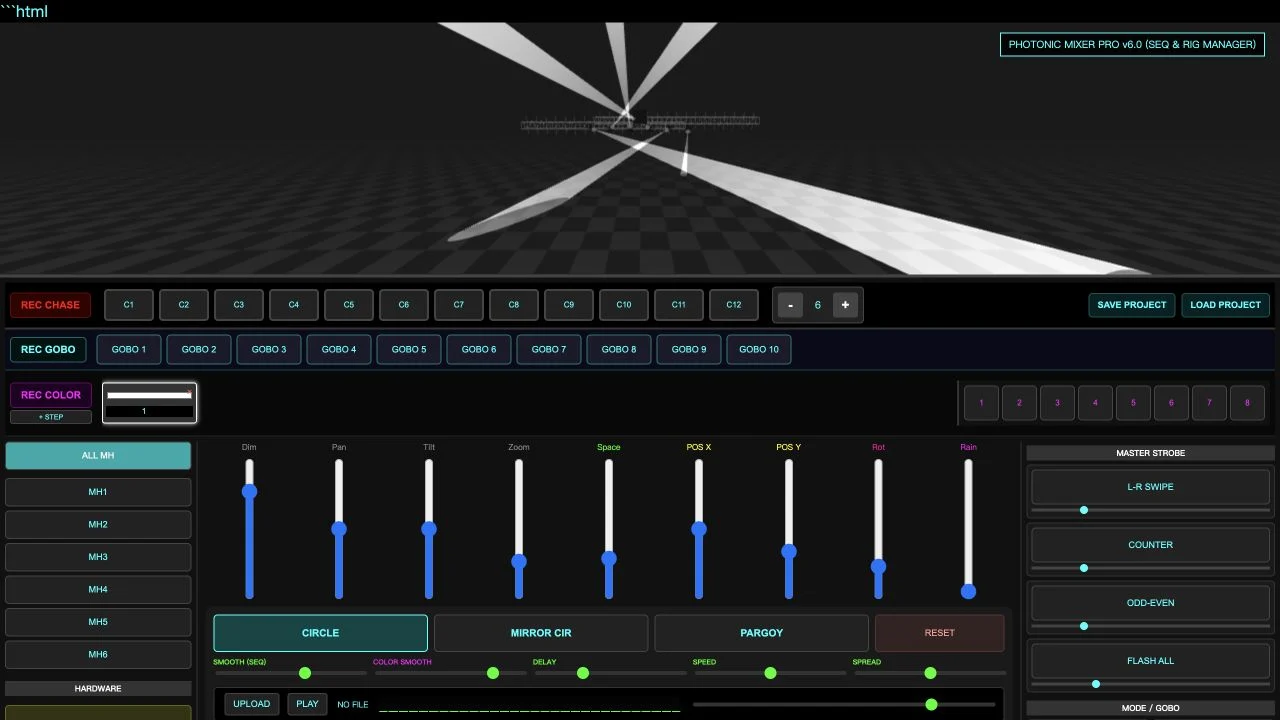
The photonic lighting v6 0 byizul netlify app search leads to a browser interface titled Photonic Mixer Pro v6.0 — BY IJUL. NavSprout selects it for a focused creative exercise: build a small arrangement of virtual lights and see how a movement changes the scene. Start with the visual idea rather than every control at once. We rendered the stage, tried CIRCLE and changed the visible fixture and rig counts.
Inside Photonic Mixer Pro v6.0
Why it’s here
A quick visual sketch can help you describe a lighting idea before discussing equipment. This application puts a rendered stage above a dense mixer panel, so you can connect a control with a visible result. Its useful starting task is a small browser experiment, not proof that a real lighting installation has been programmed or connected.
Begin with a small rig
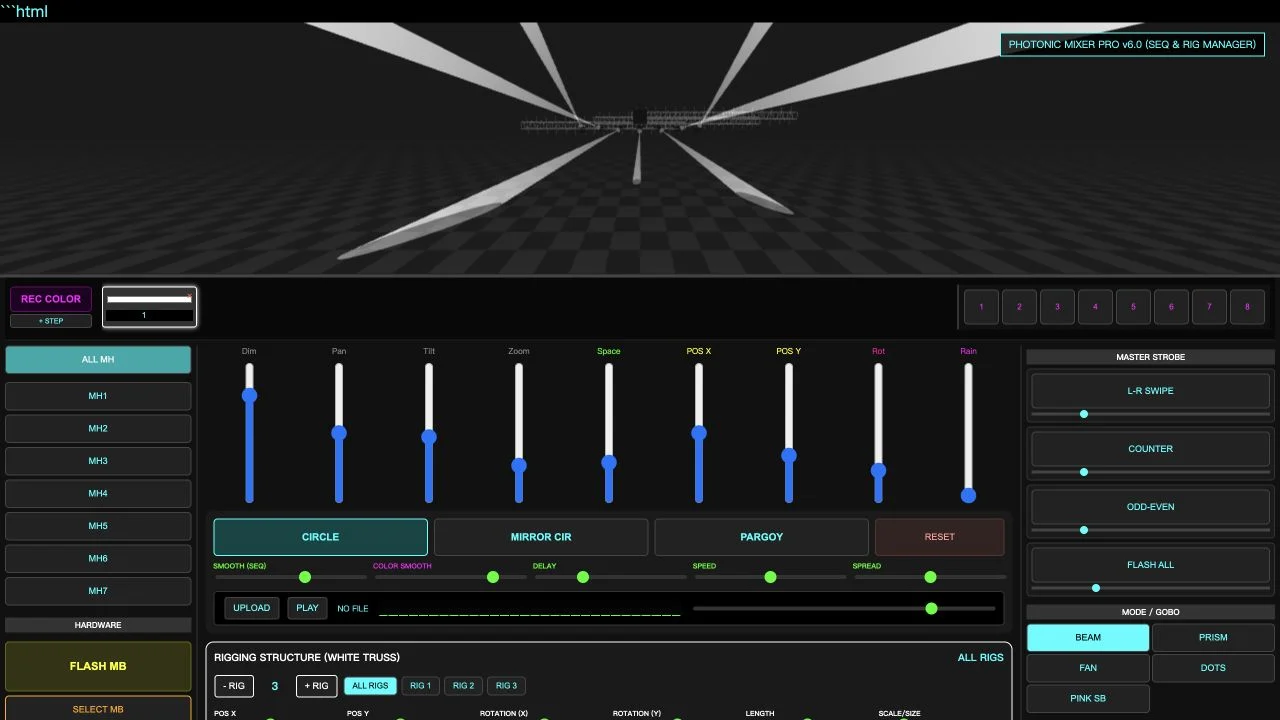
The interface initially showed six moving-head selections, MH1 through MH6, and two rig selections. Pressing the fixture plus button changed the count to seven and added MH7. Pressing + RIG changed the rig count to three and added RIG 3. Those are tested interactions you can use to understand the layout before building a more complicated scene.
Try one movement before layering effects
We selected CIRCLE and observed moving beams and a highlighted button in the preview. The panel also shows MIRROR CIR and PARGOY alongside RESET. Start by comparing one movement with the original scene and deciding what it contributes to your idea. We did not test every effect combination or measure timing accuracy.
Read the mixer as groups of decisions
Dim, Pan, Tilt and Zoom describe the light treatment, while spacing and position controls concern arrangement. Separate sequence, color and rig areas organize additional choices. When learning the interface, change one group at a time and watch the rendered scene. The slider labels are useful orientation, but they do not establish units or compatibility with a physical fixture.
Chases and colors are a later step
The page displays twelve chase slots, ten GOBO slots and eight numbered color slots, plus recording controls and a color-step area. These are visible interface features. We did not complete a recorded chase or verify a saved sequence. First build a static look or one movement you can explain, then investigate those controls if your task needs repetition.
Project files deserve a small round-trip check
SAVE PROJECT and LOAD PROJECT are present. The served page contains code for exporting JSON and reading a project file. Before spending a long session on a design, save a small experiment and check whether loading it restores the settings you care about. We inspected the implementation but did not verify a complete save-and-load round trip, so this guide does not promise that every scene detail persists.
What this exercise can establish
Our public session needed no account or payment. The preview demonstrates a visual idea in this browser; it does not validate a physical rig, real output intensity or a live show-control connection. Audio-upload and strobe controls were visible but were not exercised. Keep the first task about arrangement and movement, then evaluate additional features against a specific need.
A first lighting-preview workflow
- Open the mixer and wait for the stage preview to render.
- Identify the moving-head list and rig controls.
- Try CIRCLE and watch how the beam arrangement changes.
- Add one fixture or rig and compare the scene.
- If you plan to continue, test a small save/load cycle before relying on a longer project.
Who it suits
People exploring stage-lighting looks, hobby creators and beginners who want a concrete visual experiment.
What our check establishes
Checked October 20, 2026: rendered scene, CIRCLE movement, fixture count from six to seven and rig count from two to three. Recording, full project restoration, audio playback, strobe behavior and real hardware output were not verified.
Photonic Lighting V6.0 Byizul FAQ
What is Photonic Lighting V6.0 Byizul Netlify App?
It is the supplied Netlify address for an interface titled Photonic Mixer Pro v6.0 — BY IJUL, combining a stage-lighting preview with mixer, sequence and rig controls.
Is the product called Photonic Lighting or Photonic Mixer Pro?
The URL uses photonic-lighting-v6-0-byizul, while the visible interface title is Photonic Mixer Pro v6.0. This guide uses both to help identify the same inspected deployment.
What did you test in the browser?
The scene rendered, CIRCLE produced changing beams, fixture count increased from six to seven and rig count increased from two to three. Other capabilities have separate testing limits.
Can I add lights and rigs?
The fixture plus button added MH7 during our test. The + RIG button added RIG 3. We did not determine maximum counts or benchmark larger scenes.
Can it save and load projects?
Those controls are visible and the served code implements JSON export and file loading. A complete save-and-load round trip and preservation of every setting were not verified.
Does it control real lighting hardware?
No physical hardware connection was verified. Hardware labels and a rendered light scene do not establish DMX, Art-Net, USB or fixture compatibility.
Can I use music with it?
UPLOAD, PLAY and volume controls are present. We did not upload an audio file or test playback or synchronization.
Is it free to try?
The tested public controls required no payment or account on October 20, 2026. Complete commercial terms, licensing and future feature access were not verified.
Should I start by recording a chase?
Start with a simple arrangement and one movement so you can explain what changed. Recording is a separate workflow that was not completed in this review.
Source and verification
Photonic Mixer Pro v6.0 — original Netlify deployment ↗. Reviewed October 20, 2026: rendered scene, CIRCLE motion, fixture count increase and rig count increase. We inspected the served HTML for project-file behavior. A verified save/load round trip, recorded sequence, audio playback and hardware integration were not completed. Screenshots are original browser captures. This is an independent guide.