
webXash at x8BitRain.github.io
Find webXash at x8BitRain.github.io, start a Half-Life demo, and understand local game files, launch settings, and saves before playing.
Why it’s here
webXash gives people searching the GitHub Pages address a usable launcher rather than just an engine repository. We selected Uplink, reached its game menu and opening scene on Easy, saved once in-game, and found save000.sav in a second launcher tab in the same browser. The guide separates those observations from untested full-game and network setups.
Who it fits
Desktop players looking for the exact x8BitRain GitHub Pages launcher and a documented way to try a Half-Life demo.
A task to try: Launch Uplink and inspect one test save
- Open the webXash launcher and select Uplink (45M) under Half-Life Demos.
- Select Start Demo, wait for the game menu, then choose New game and a difficulty.
- Use the in-game Save/load game menu if you want a sample save. Check the launcher save list in the same browser and keep backups before relying on it.
Where to be careful
Full Half-Life and Counter-Strike files are not included with the free launcher. Full-game imports, save restoration, multiplayer, mod compatibility, mobile play, and sustained performance were not tested. Some in-game menu labels displayed untranslated localization keys.
x8BitRain GitHub io webXash: how to run Half-Life in your browser
Searching for “x8bitrain github io webxash”? The destination is webXash at https://x8bitrain.github.io/webXash/. Its classic-styled launcher offers Half-Life demos, a Counter-Strike mode, local game-file loading, launch options, and a save manager. We launched Uplink, entered its opening scene, and created a test save. This guide shows what actually worked and what still requires your own files or further setup.
Tested October 16, 2026 in a desktop browser. We inspected the launcher, selected Uplink (45M), used Start Demo, chose New game → Easy, reached the opening 3D scene, and used Save/load game → Save game. A second launcher tab in the same browser displayed Half-Life/save000.sav; selecting it enabled Download and Remove. Switching to Counter-Strike hid the demo and save panels. No registration or payment appeared. We did not test full retail-game imports, restore the save, export/import saves, complete Uplink, join multiplayer, run mods, benchmark performance, or audit network/privacy behavior. Screenshots are our own captures of the original app.
The exact webXash address behind the search
Open https://x8bitrain.github.io/webXash/ for the launcher. The matching repository is x8BitRain/webXash on GitHub. Keep the webXash path as written when copying the link: this guide links to that specific GitHub Pages project, rather than to another Half-Life port or a download page using a similar name.
The terms in the search describe different things: x8BitRain identifies the GitHub account, github.io is the hosting domain, and webXash is the project path. You do not need to create a GitHub account to open the public launcher; our demo test did not request one.
NavSprout is an independent directory. We do not host the game runtime or distribute the full game data. Use the Open website button for the actual app and the repository link for its own instructions.
What is webXash, and what is it not?
The repository describes webXash as a frontend for webxash3d-fwgs, a browser engine port. It is distinct from Valve’s full-game distribution.
In practical terms, the first page is a launcher: you pick what to run, supply a data source or select a demo, and review startup settings. After the demo loads, the browser shows a rendered game menu and then a 3D scene. That transition matters when troubleshooting: an available launcher does not by itself prove that the selected game data has loaded.
Our test establishes a working Uplink startup in the inspected environment. It does not establish complete Half-Life campaign compatibility, Counter-Strike matchmaking, or identical behavior on every browser. The Counter-Strike entry is a mode in the launcher; we did not launch a Counter-Strike session.
Read the launcher before choosing a game
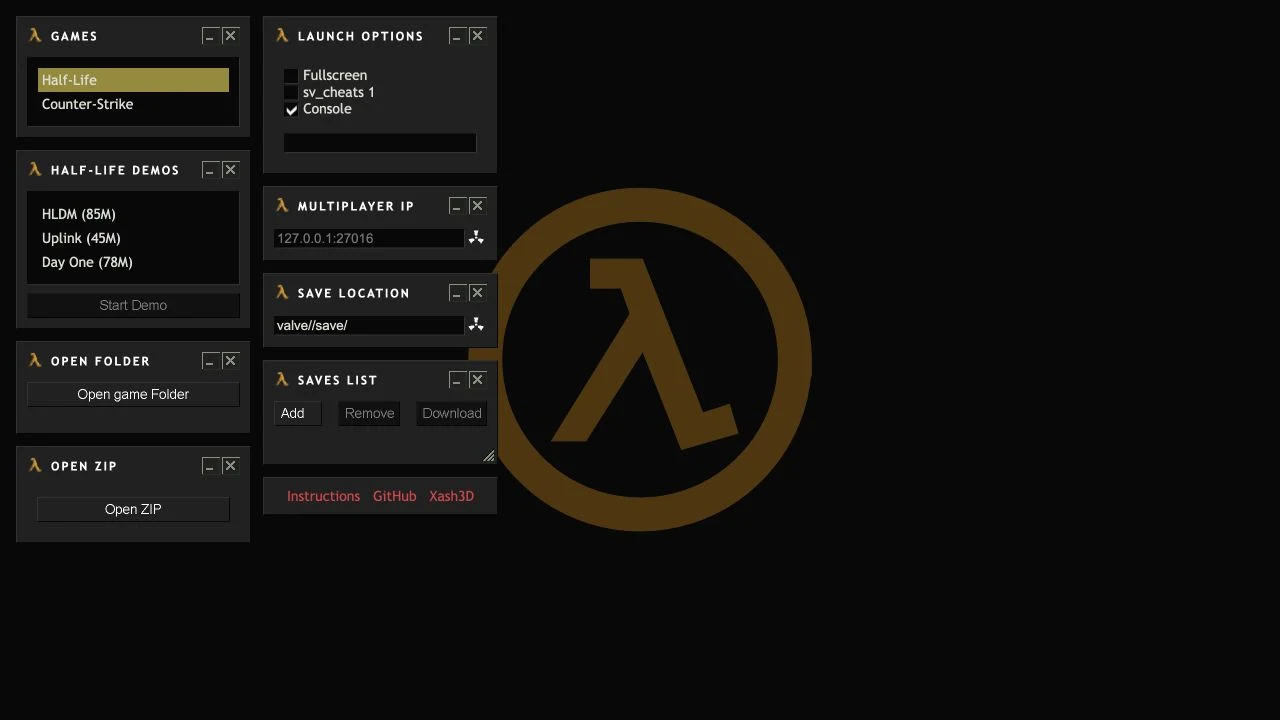
The initial interface is arranged as small dark panels. Games contains Half-Life and Counter-Strike. With Half-Life selected, a separate demo panel lists HLDM (85M), Uplink (45M), and Day One (78M). Those are the sizes printed by the interface, not transfer measurements from our test.
On first inspection Start Demo was disabled. Selecting Uplink made it usable. If you see a disabled button, first check whether a demo row is selected; repeatedly clicking a disabled control will not start a download.
Folder and ZIP controls sit separately from the demo selector. The right-hand panels show startup options, a multiplayer endpoint field, and save controls. This is useful orientation before importing anything: the game selection, data source, startup arguments, and save list have different jobs.
| Panel | What we observed | How to use that information |
|---|---|---|
| Games | Half-Life and Counter-Strike choices | Choose the intended game before checking the available panels. |
| Half-Life Demos | HLDM, Uplink, Day One | Select a demo before using Start Demo. |
| Open folder / Open ZIP | Two file-selection buttons | These are separate from the hosted demo route. |
| Launch Options | Fullscreen, sv_cheats 1, Console, and an argument field | Read the settings before launch; an option’s presence is not a tested guarantee. |
| Saves List | Add, Remove, Download and grouped save entries | Select a save row before expecting Download or Remove to be available. |
How to start the Half-Life: Uplink demo
Uplink was the shortest labeled download among the three demo entries at inspection. We used it to test the complete transition from launcher to game scene without selecting personal files. The demo ran without a sign-in or checkout.
A loading pause and console output appeared before the menu became available. We did not measure download time or frames per second, so the screenshots should not be read as a speed benchmark. Wait for the actual menu before deciding that loading has finished.
- Open the original webXash page and select Half-Life under Games.
- Select Uplink (45M) in the Half-Life Demos panel. Confirm that Start Demo is enabled.
- Select Start Demo and let the runtime and demo data load.
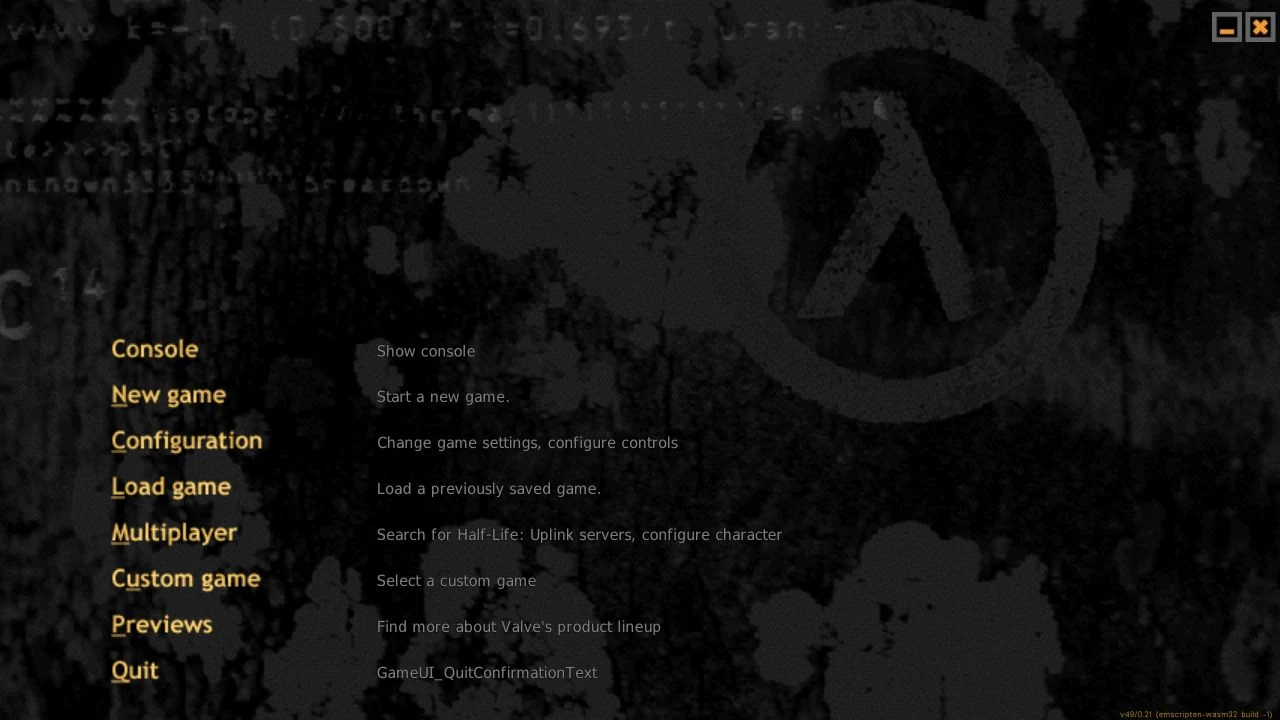
- When the Uplink menu appears, choose New game and a difficulty. We used Easy.
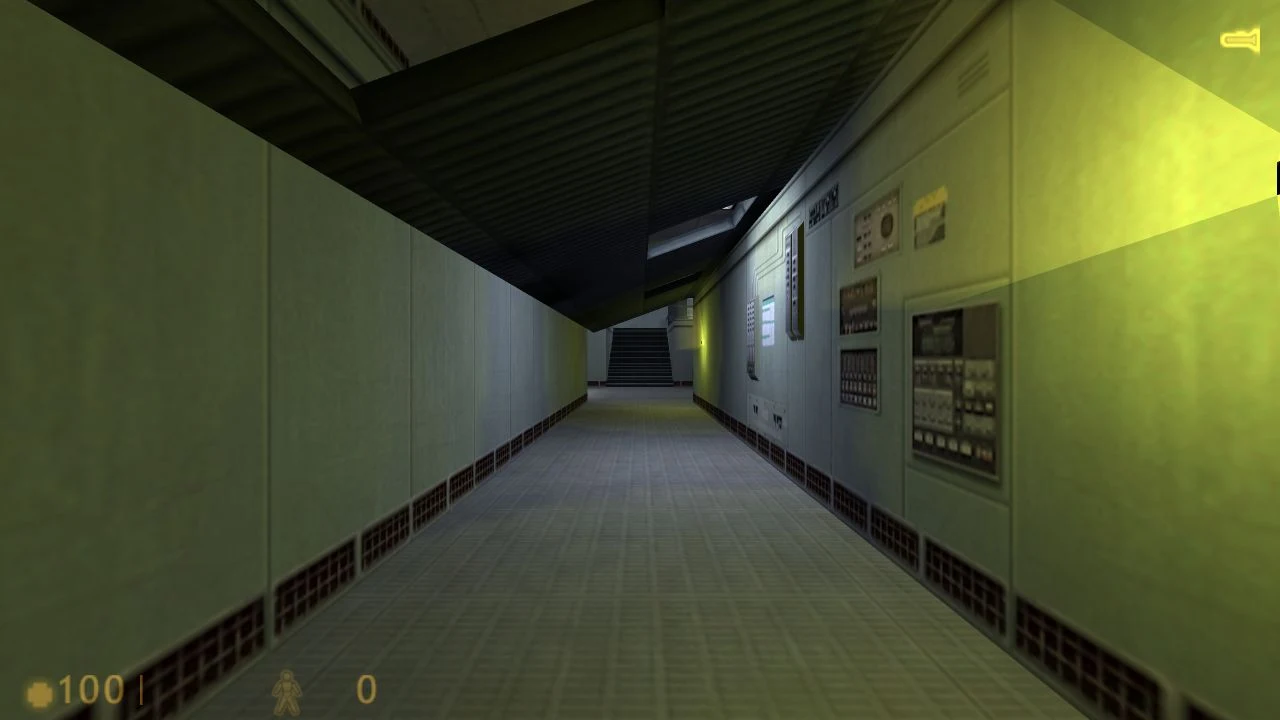
- Wait through the opening sequence. Our run reached the corridor scene shown below. Escape opened the in-game menu.
What our Uplink run actually confirmed
After New game → Easy, the opening sequence progressed into a first-person corridor view with the health and suit indicators visible. We captured that scene directly from the running original app. Escape opened a menu with Resume game, Configuration, and Save/load game.
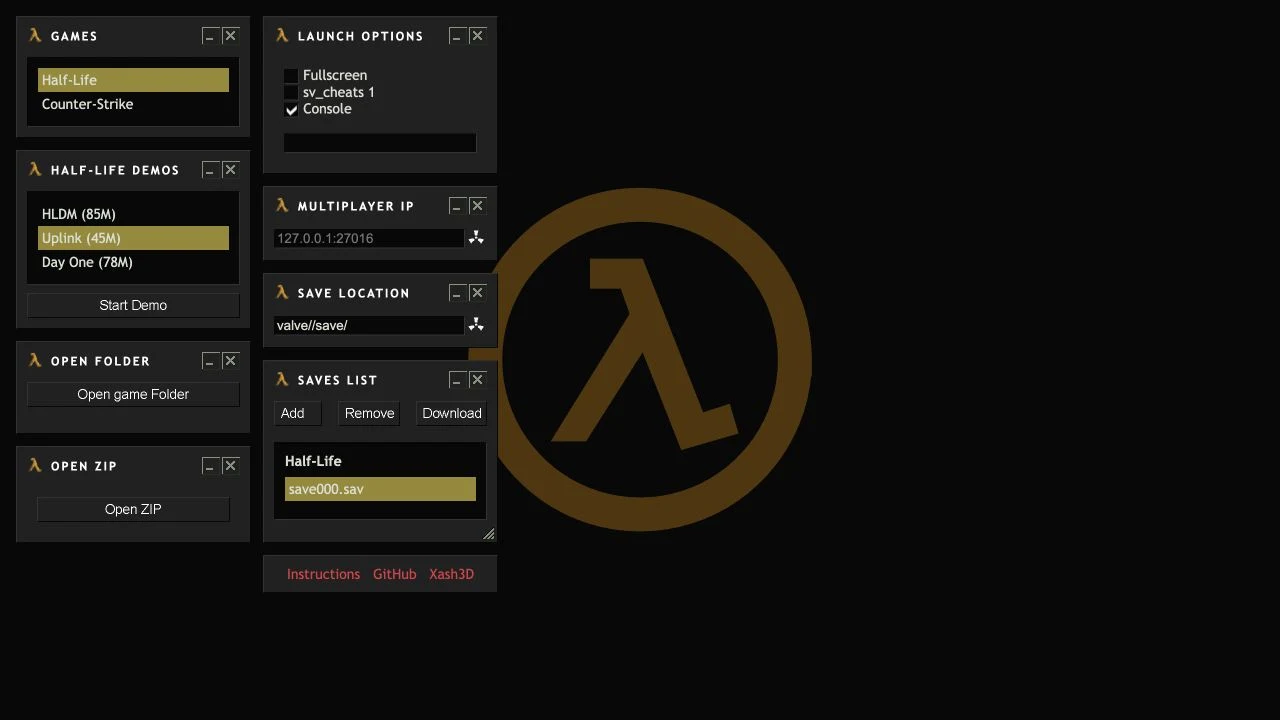
We followed Save/load game → Save game and used the selected new-save row. The game returned to the scene and displayed a Saved message. Later, a second launcher tab showed save000.sav under Half-Life. This is evidence of one save being captured and visible in the same browser, not proof of long-term retention or a successful restore.
Some save-menu labels appeared as localization identifiers rather than polished English descriptions. The named save action still completed in our test. If a label looks technical or untranslated, compare the menu heading and the visible action rather than assuming it is a different feature.
Full Half-Life and Counter-Strike: bring your own files
The project requires your own game data. For folder loading, select the installation root containing valve and, where applicable, cstrike. ZIP contents should retain those directories. For mods, keep valve alongside the mod folder and follow the project’s launch instructions.
The demo route and the full-game import route are different tasks. A successful Uplink run does not show that your retail installation, an expansion, or a particular mod has the required files. Before choosing a directory, identify the intended game and inspect its folder layout yourself.
We did not select a local game folder or ZIP, grant directory access, or test an import. That keeps the scope clear: the file-loading controls are documented options here, while the hands-on evidence concerns the hosted demo. Refer to the repository’s examples before preparing a large archive.
Launch options and desktop controls
The launcher displayed Fullscreen, sv_cheats 1, and Console checkboxes plus a text field for arguments. In our initial state Console was checked, while Fullscreen and sv_cheats 1 were unchecked. We left those initial checkbox settings unchanged for the demo test.
These controls affect startup rather than the choice of game data. If you are diagnosing a problem, make one deliberate change at a time and record it. Otherwise, a different game selection, new files, and changed arguments can make it hard to identify which step caused the result.
Once the game menu is visible, Configuration is the place to inspect its own controls. We used mouse selection for menu actions and Escape to return from the scene to the menu. We did not verify every movement binding, controller support, touch controls, or fullscreen behavior. The project FAQ recommends a keyboard and mouse.
Browser save manager: what we verified
Before playing, the launcher save list was empty and Remove and Download were disabled. After our in-game save, a second tab in the same browser showed Half-Life with the file save000.sav. Clicking that file enabled both actions. This gives the save panel a concrete tested example.
The repository says saves use IndexedDB. Treat this as browser-local storage, not an account-backed cloud service. We did not test another profile or device, restore the file, or verify retention after clearing site data. A save appearing in a list is a useful check, but it is not the same as verifying that it can be loaded.
If the progress matters to you, use the available Download action to keep a separate copy and test recovery before relying on it. We observed the button becoming enabled but did not export or re-import the test file. Add and Remove are also present; neither was exercised in this review.
Switching the launcher to Counter-Strike hid the demo and save sections in our inspection. Do not expect the Half-Life save panel to remain available in every game mode.
Multiplayer needs more than the visible IP field
The launcher exposes a Multiplayer IP field with 127.0.0.1:27016 as its placeholder. A placeholder is an example value, not a public server invitation. We left it unchanged and did not join or create a server.
The project documentation describes WebSocket-capable server setups and direct endpoint entry, rather than ordinary internet server discovery. Follow its multiplayer instructions for the required server configuration.
The Uplink menu itself included a Multiplayer entry, but an entry in a menu does not establish a successful connection. If your goal is playing with friends, verify server compatibility and connectivity separately from the single-player demo startup described here.
webXash not working: identify the last successful stage
Start with the last screen you could use: launcher, loading output, game menu, scene, or save list. Our demo passed through all five, but each stage tests something different. A working menu cannot confirm a mod, and a missing save cannot be diagnosed from a loading screen alone.
For an unexpected result, note the exact URL, selected game, data source, launch arguments, browser, and visible error. These details are more useful than a general “does not work” report. Do not clear browser storage as a first troubleshooting step when it might contain progress you want to preserve.
| Symptom | First check | What this guide establishes |
|---|---|---|
| Start Demo is disabled | Whether a demo entry is selected | Selecting Uplink enabled it in our test. |
| Launcher works but game has not appeared | Whether loading has reached the actual game menu | A loading pause occurred before our Uplink menu appeared. |
| A full game or mod fails | The data layout and project instructions | We did not test a full-game or mod import. |
| Technical-looking menu text | The menu heading and surrounding actions | Some save-menu labels were untranslated, but one save succeeded. |
| Download is disabled | Whether a saved file row is selected | Selecting save000.sav enabled Download. |
| Save manager disappeared | The selected game mode | It was hidden after selecting Counter-Strike. |
| Cannot find a multiplayer server | The required endpoint and server setup | No multiplayer connection was tested. |
Is webXash free, and who is it best for?
The public launcher and our Uplink demo run required no account or payment. That supports calling the tested launcher/demo access free. It does not mean full commercial game files are included, nor does it establish future availability of the hosted demos.
This entry best fits someone searching for the exact x8BitRain project who wants a documented first run and a clear account of the launcher’s controls. It is also useful for separating a source-code project, a browser runtime, game data, and saved progress before experimenting.
If your priority is a full campaign, a particular mod, mobile play, reliable cross-device saves, or multiplayer sessions, those requirements need their own checks. Our review deliberately stops short of certifying them. The original icon and all four screenshots come from the product, while the explanations and test notes are NavSprout’s independent editorial work.
Common questions
What is x8bitrain github io webxash?
It is the search phrase for webXash at https://x8bitrain.github.io/webXash/, a browser launcher for Half-Life-related engine content, hosted demos, and local game-data loading.
What is the correct webXash URL?
Use https://x8bitrain.github.io/webXash/. The repository linked by the launcher is https://github.com/x8BitRain/webXash.
Can I try webXash without importing my own files?
Yes. We selected the hosted Uplink demo, chose Start Demo, and reached its menu and opening scene without selecting local files.
How do I enable Start Demo?
Select a demo row first. In our initial launcher state the button was disabled; selecting Uplink (45M) enabled it.
Which demos did the launcher list?
At inspection it listed HLDM (85M), Uplink (45M), and Day One (78M). Those are the interface labels, not measured download sizes.
Is the full Half-Life game included for free?
The tested launcher/demo access was free. The project requires you to supply full-game data separately; launcher access does not give you ownership of the full games.
Does Counter-Strike work in webXash?
A Counter-Strike mode is available, and selecting it hid the Half-Life demo and save panels. We did not import Counter-Strike files or test a match.
Can webXash save game progress?
We saved once through Uplink’s in-game menu. A second launcher tab in the same browser displayed Half-Life/save000.sav. Restoring, exporting, and long-term retention were not tested.
Why is the save Download button disabled?
In our test it became enabled after selecting the saved file row. An empty list or no selected row is different from a failed download.
Are saves synced between devices?
No cross-device sync was verified. Keep a separate backup and test recovery before trusting any browser-local progress.
Does it work on a phone or with touch controls?
Mobile and touch play were not tested. This review covers a desktop browser, not a verified phone experience.
Can I connect to multiplayer immediately?
A visible IP field and menu entry do not prove a connection. We did not join a server; use the project’s multiplayer setup instructions.
Why do some in-game labels look like code?
Some save-menu text appeared as localization identifiers in our Uplink run. Despite that incomplete labeling, one in-game save completed and appeared in the launcher.
Is this guide a full Half-Life compatibility test?
No. We verified the launcher, Uplink startup, its opening scene, and one captured save. Full campaigns, imports, mods, recovery, multiplayer, and sustained performance remain outside the test.
Sources & editorial method
Written by NavSprout Editorial. Published and checked . We use primary project pages and distinguish interface observations from features we have not tested. External websites can change after this check.
- webXash — original launcher and our Uplink session ↗
- x8BitRain/webXash — project README, file loading and limitations ↗
- Project instructions — multiplayer ↗
- Project instructions — save manager ↗
Independent editorial coverage. NavSprout is not the developer of the apps described here.
Report a correction →