What is PicCollages?
PicCollages is a browser-based photo composition tool for grids, stitched images and freeform canvas designs. NavSprout places it in Design & creative because its clearest use is arranging existing pictures into a finished visual: a family album page, travel keepsake, social graphic or simple comparison. It is a practical image-layout option rather than an AI image generator or a replacement for a full PSD workflow.
Why it’s here
A collage often needs less machinery than a full design project. PicCollages offers three useful starting points: a structured photo grid, a long strip and a canvas you arrange yourself. Choose by the result you need to export, rather than by the longest list of editing controls.
Which editor should you use?
Choose a grid when a set of photos needs consistent frames. Use the long-image editor when the reading order matters, such as a vertical sequence. Choose Free Layout when text, decorations and pictures need independent positions. The site also links crop, split and compression utilities, which serve narrower preparation tasks.
What we checked in the canvas
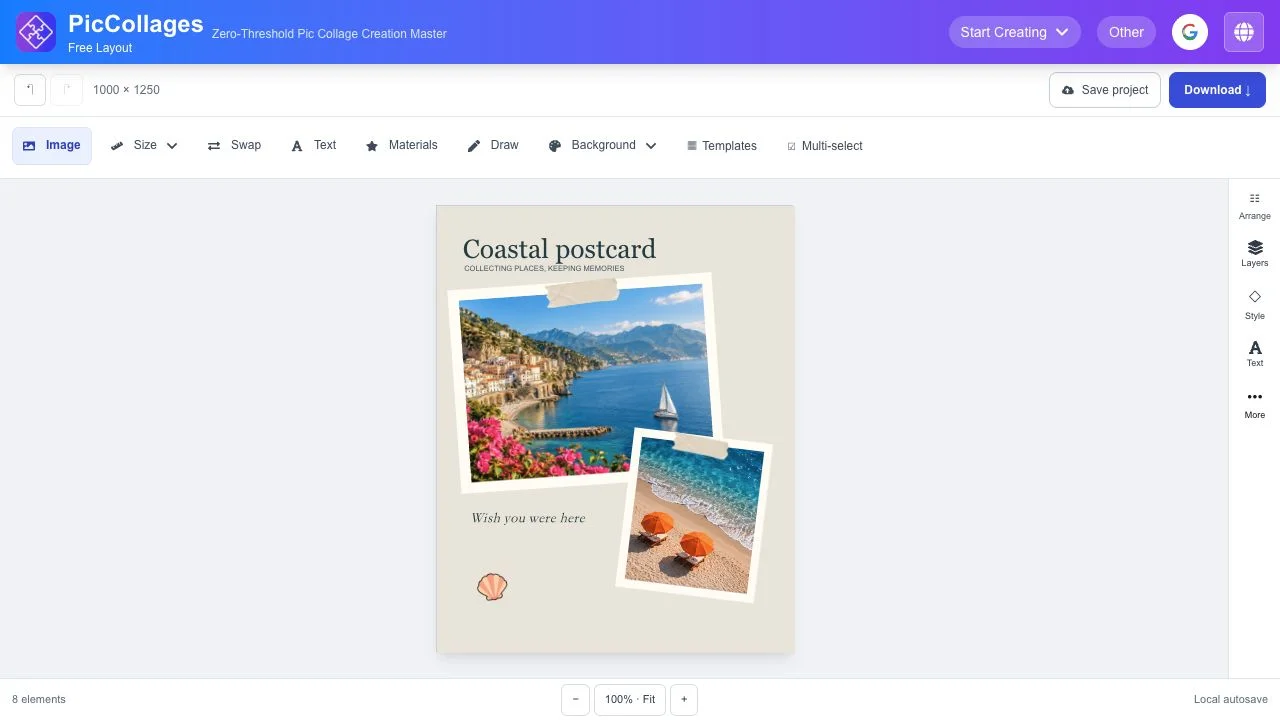
We opened Free Layout without creating an account, switched to English, browsed its template panel and applied the public Coastal postcard design. The editor then displayed a 1000 × 1250 composition with eight elements and controls for images, text, background, layers, size, undo and download. This confirms the template-opening flow. We did not import personal photos, complete an export or test a cloud save.
A small task to try
Prepare a two-photo travel card with one short caption. First choose the output shape, then select a layout that gives the main photo enough room. Check whether the crop preserves the subject and whether the caption is readable at the final display size. Export a copy, reopen it on your device and inspect the result before posting it. This is a suggested trial rather than an export benchmark.
Local editing and optional cloud saving
The official privacy policy distinguishes browser editing from Save project. It states that choosing a cloud save uploads source images, settings, the finished image and a thumbnail. Device-local drafts and a cloud library have different retention and editing behavior; read the current policy before treating cloud storage as an editable backup. The site also discloses advertising and authentication storage. Local photo processing does not mean that every site request is local.
Read the privacy policy ↗Free access and practical limits
The site describes core editing and downloads as free without an account or added watermark, funded by advertising. We observed an accessible canvas, not every editor or download setting. For complex layered-file compatibility, compare Photopea; for broader interface design and prototyping, consider Figma. A collage editor is most useful when the output is a finished image, not a shared application prototype.
Try a two-photo travel card
- Choose one output: grid, ordered strip or freeform composition.
- Start with a public template or photos you have permission to use.
- Adjust the main image crop, spacing and one short caption.
- Check the composition at its intended display size.
- Export and inspect the resulting file before sharing.
- Choose optional cloud saving only after reviewing the upload and storage policy.
PicCollages FAQ
Is PicCollages free?
The official website states that core editing and downloads are free without a subscription or added watermark. Advertising supports the service; we did not audit every tool or export option.
Do I need an account?
The canvas and public template workflow were accessible without creating an account. Account and cloud-saving features are separate.
Are my photos always kept on my device?
The privacy policy describes local editing, but choosing Save project uploads images and project-related data to a private cloud library. Review that distinction before saving sensitive images.
Is PicCollages an AI image generator?
Its core workflow arranges and edits existing images using layouts and canvas controls. It is not presented here as an AI generation tool.
Is this a Photoshop or PSD replacement?
This listing concerns collage composition and image output. PSD compatibility and full professional layer workflows were not verified.
What was actually tested?
We opened Free Layout, browsed templates and applied the public Coastal postcard design. No personal photos, account, finished export or cloud save were tested.
Related by purpose
Photopea is a different choice for more extensive image and layered-file work. Squoosh offers a focused compression step after a visual is finished. Figma serves interface design and prototype collaboration.
Sources and review scope
Reviewed October 23, 2026 using public product information, the privacy policy and a short canvas/template check. Account storage, full export quality, mobile operation and network handling of user images were not tested.