
CHSB Pro is the ChSB practice platform at chsbpro.netlify.app, branded CHSB_PRO on the website. It organizes preparation for quarterly summative assessment around grades 5–11, school year, quarter and subject. NavSprout includes it for a concrete study task: find a suitable paper, check its time and scoring, and identify one topic to revise before starting. The original site names Teacher Shokirboyev Asadbek as its author.
Why it’s here
A large test library becomes useful when the next action is clear. CHSB_PRO exposes the grade, subject, quarter, question count, time limit and points before a learner begins. Our first-session guide focuses on those choices and the public formula notebook. We inspected the profile step without submitting student details, so the timed attempt and its results remain outside this review.
Find the right CHSB Pro address
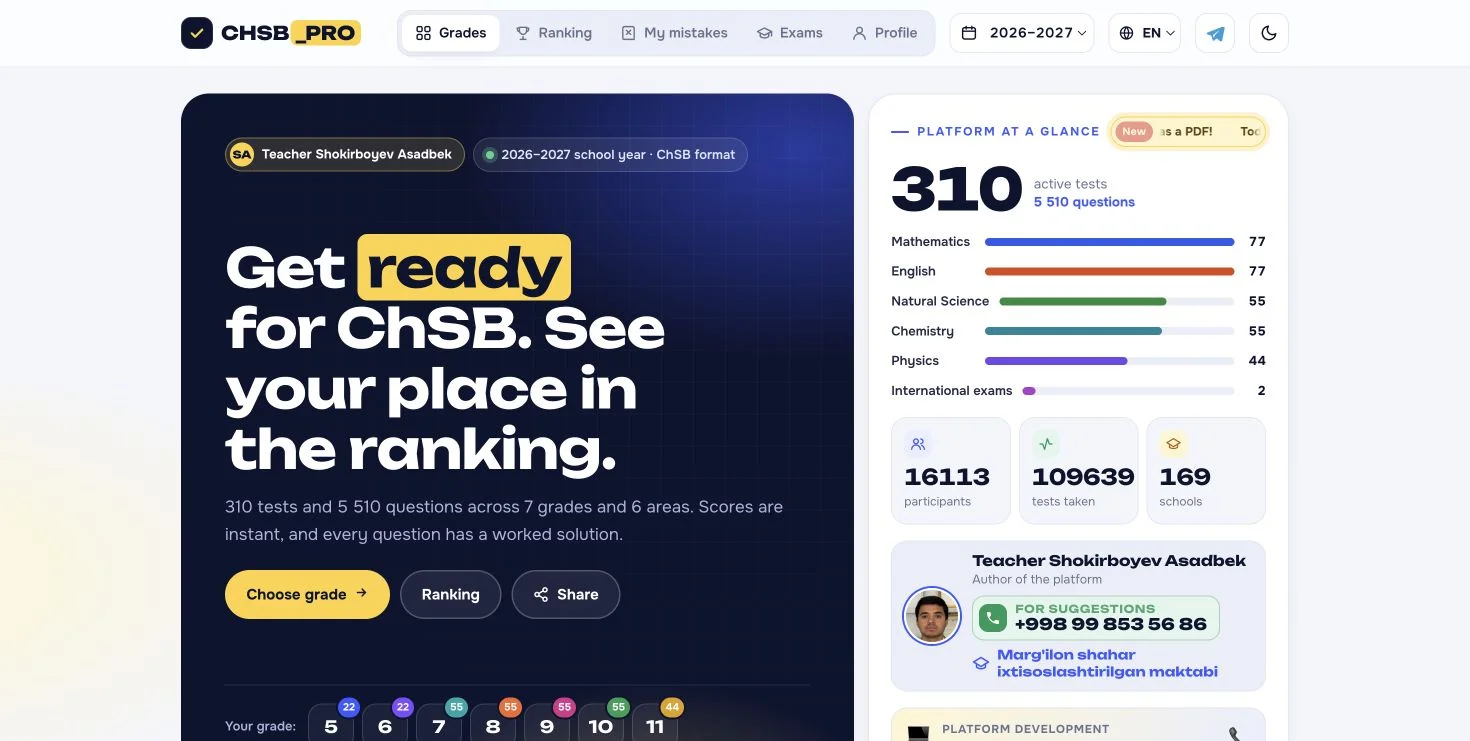
The supplied destination is chsbpro.netlify.app. Netlify is its hosting domain; the app itself is called CHSB_PRO. Its footer expands the purpose as a quarterly assessment preparation platform for grades 5–11. The subject and school references are oriented toward Uzbekistan. This makes it a focused preparation resource rather than a general course covering every school system or a source of official exam answers.
Match the school year and quarter first
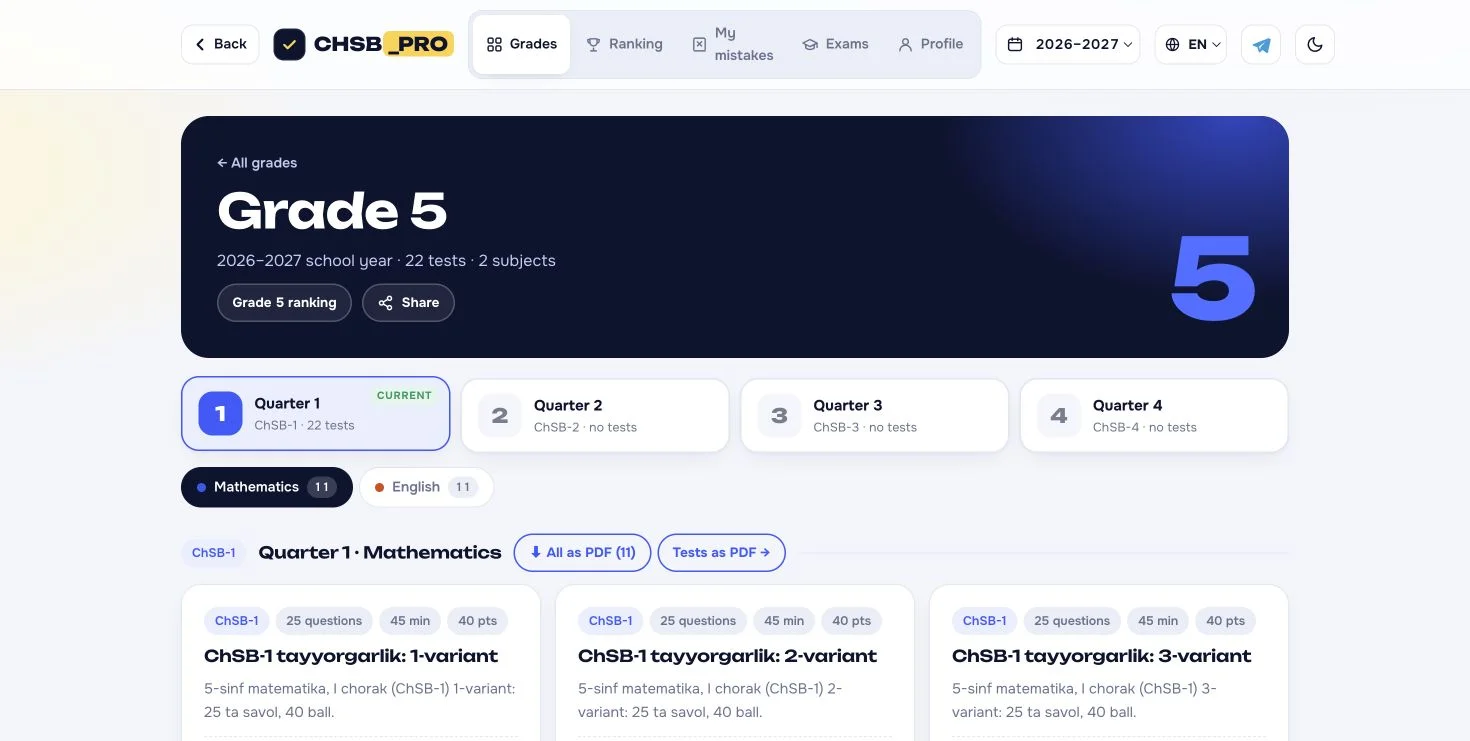
The reviewed selector showed the 2026–2027 school year. Quarter 1 contained test listings, while Quarters 2–4 were marked as having no tests at the time of inspection. Start with that context before comparing papers. An empty quarter is not necessarily a loading fault: it may simply have no listed material. Counts and availability can change as the author adds content.
Choose a grade, then a subject
The homepage offers grades 5 through 11, but each grade does not necessarily contain every subject. In our Grade 5 check, Mathematics and English were the two subject tabs, with 22 papers listed across them. The broader homepage also named Natural Science, Chemistry and Physics, plus a separate international-exams area. Look inside your own grade instead of assuming a subject shown on the homepage is available for everyone.
Read the paper card before committing to a session
The first Grade 5 Mathematics paper displayed 25 questions, a 45-minute limit and 40 points. That is useful planning information: reserve the time and check whether the topic matches your current work. These are properties of the inspected paper, not a promise that every test uses the same format. Its title and description remained in Uzbek even with English interface controls selected.
Know what happens after Start
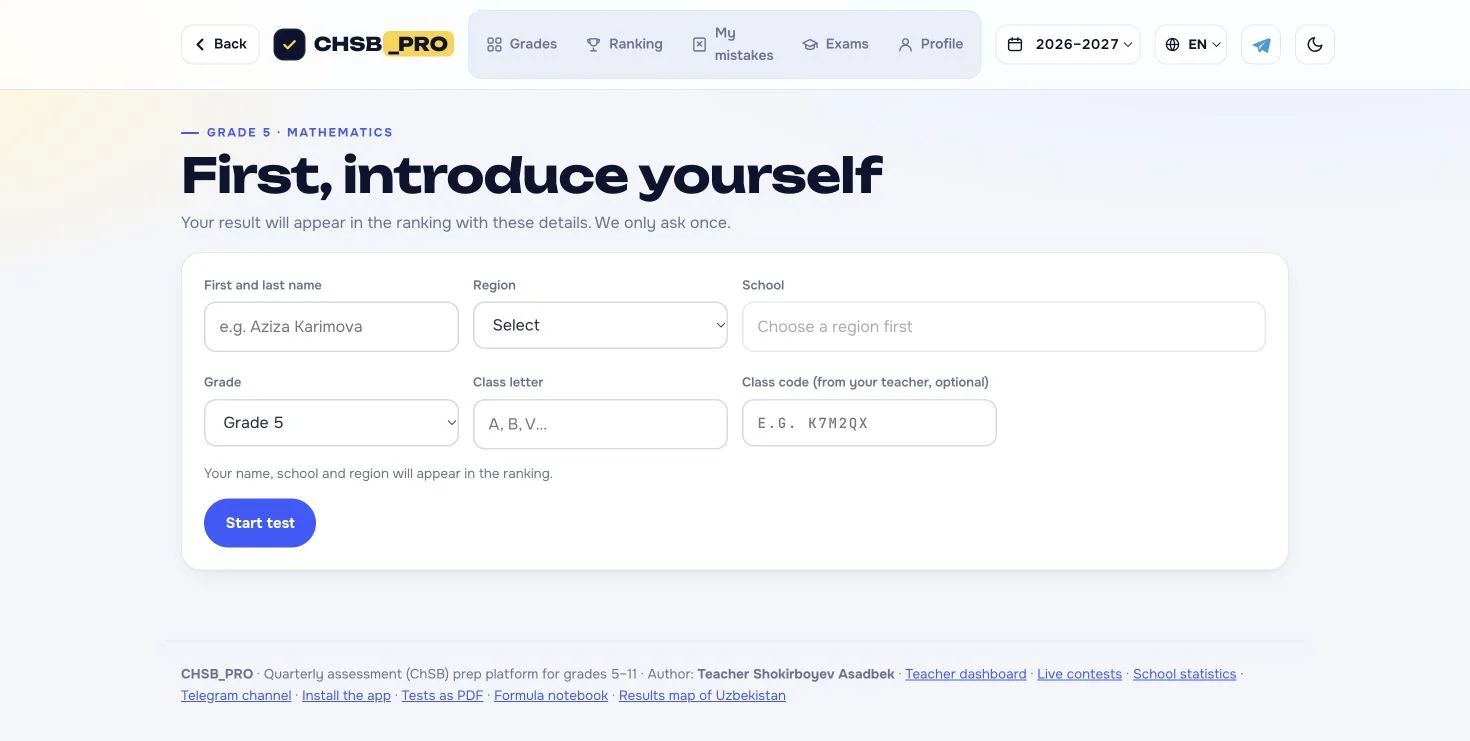
Following the paper’s Start link opened a profile form asking for first and last name, region, school, grade and class letter, with an optional teacher class code. The screen explicitly said the name, school and region would appear in the ranking. Review that notice before entering details, especially when choosing a school-linked practice tool for a child. We left the form empty and did not begin or submit an attempt.
Use the formula notebook for a smaller first task
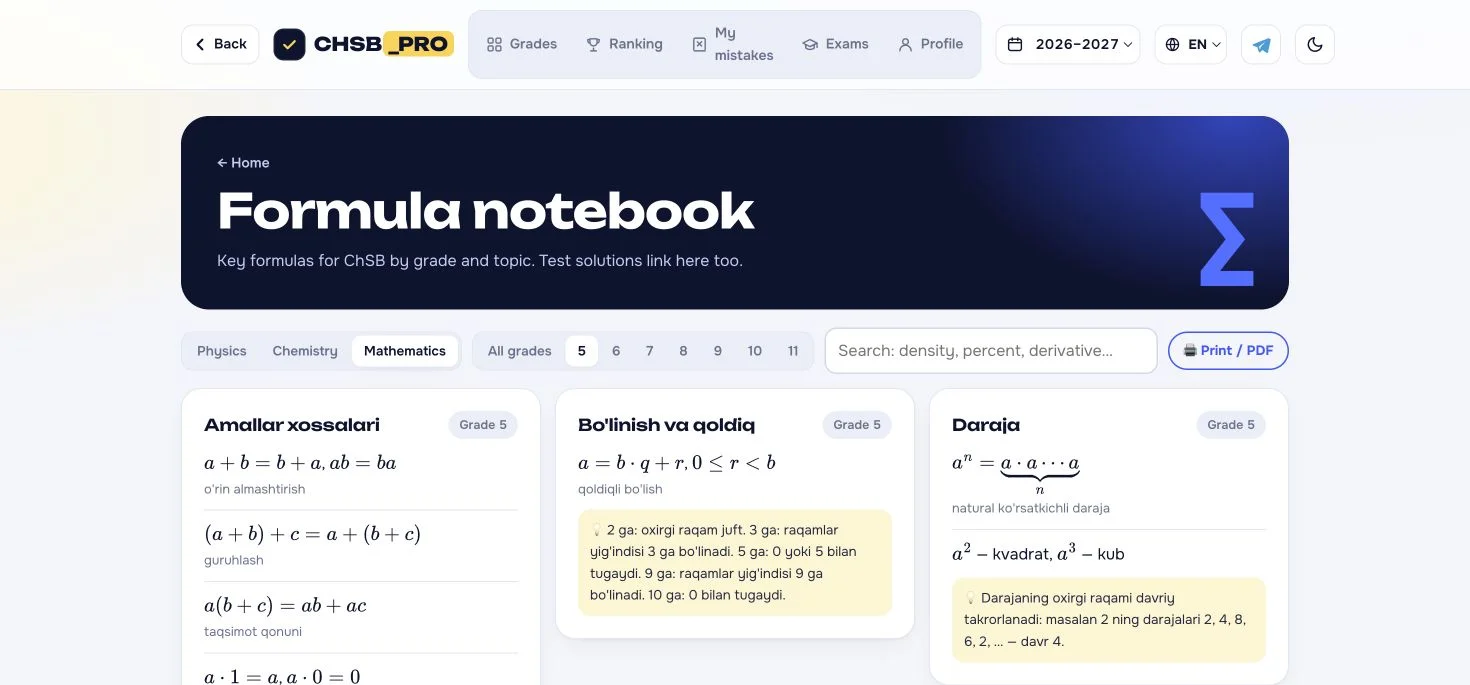
You can inspect the public Formula notebook before taking a timed paper. It provides subject buttons for Physics, Chemistry and Mathematics, grade filters, search and a Print / PDF control. We opened it and selected Grade 5. A useful revision task is to choose one formula, explain the variables and solve a similar textbook problem. The notebook’s explanatory material included Uzbek text in the English interface.
Treat result features as a follow-up workflow
The site presents instant scoring, worked solutions, My mistakes and certificates as parts of its practice loop. Those could support a routine of attempting a paper, understanding an error and revisiting the topic. We did not complete that loop, generate a certificate or check the accuracy of every solution. Use a teacher’s explanation or a trusted textbook to resolve a disagreement rather than treating a leaderboard position as proof of understanding.
PDFs, language and return visits
Test cards include PDF download controls and the footer links to a Tests as PDF section. The header lists UZ, RU, EN and QQ language options; we selected EN for the screenshots. The app also exposes an installation guide and a teacher dashboard. PDF generation, installation, offline behavior and teacher account functions were not completed in this review. Begin with the public material and add those workflows only when you need them.
What was visible, and what was tested?
| Area | Review evidence |
|---|---|
| Grades and papers | Opened Grade 5, inspected subject and quarter tabs, and read the first Mathematics paper card. |
| Test entry | Opened the profile requirement and ranking notice; no details entered or attempt submitted. |
| Formula notebook | Opened the public reference page and selected the Grade 5 filter. |
| Teacher tools | Read the class-code explanation and login/signup entry; authenticated reports not tested. |
| Results and downloads | Scoring, solutions, certificates and PDF controls described or visible; outputs not generated. |
A useful first visit
- Open CHSB_PRO, select the school year and check which quarter has papers.
- Choose your grade and subject, then read the paper’s question count, time and points.
- Open Formula notebook and revise one related topic before a timed attempt.
- If choosing Start, read the profile and ranking notice before entering student details.
- After your own completed attempt, use solutions and mistake review to choose the next revision topic.
Real CHSB Pro screenshots
Actual browser views captured with the EN interface selected on October 30, 2026. These images show the public workflow, including the empty test-entry form.
CHSB Pro Netlify app FAQ
What is the CHSB Pro Netlify app?
CHSB_PRO is a browser-based quarterly assessment practice platform at chsbpro.netlify.app, aimed at grades 5–11 in an Uzbekistan school context.
Which grades and subjects does CHSB Pro cover?
The public grade selector covers grades 5–11. The homepage names Mathematics, English, Natural Science, Chemistry and Physics, but availability differs by grade. Grade 5 showed Mathematics and English during our review.
Why are some quarters empty?
On October 30, 2026, Quarter 1 had listed papers and Quarters 2–4 were labeled as having no tests. Check the selected school year and current listings before assuming something is broken.
Do I need to enter personal details to start a test?
The inspected Start link opened a form for name, region, school, grade and class letter, with an optional teacher code. It stated that name, school and region would appear in rankings. We did not submit the form.
Is every test 45 minutes long?
No universal duration was established. The inspected Grade 5 Mathematics paper displayed 25 questions, 45 minutes and 40 points. Check each paper’s own card.
Can I use CHSB Pro in English?
EN is an available interface option and translated the main navigation and public headings in our check. Some paper titles, descriptions and formula notes remained in Uzbek.
Does it provide PDFs and certificates?
PDF controls and certificate descriptions are visible on the site. We did not download a paper or generate a certificate, and no official qualification status was established.
Is CHSB Pro free?
We could browse grades, test descriptions and the formula notebook without payment. We did not complete a test or teacher registration, so full-access pricing and terms remain unverified.
Sources & review scope
Primary source: CHSB_PRO at chsbpro.netlify.app. We inspected its Grade 5 papers, first Mathematics paper entry, formula notebook and teacher dashboard entry on October 30, 2026. The site itself credits Teacher Shokirboyev Asadbek. The icon is the original PNG declared by its HTML and web-app manifest, copied unchanged.
We did not enter student details, create a teacher account, complete or submit a test, download PDFs, generate certificates, audit the question bank or verify official examination status. Catalog totals are dated provider claims, and listed languages do not establish full content translation. This independent guide describes the observed interface and its limits.
Browse education and learning tools → · How we review web projects →