
What is Brisbane Streets?
Brisbane Streets puts a fictional Brisbane city scene in your browser, with movement, vehicles and a selection of local-themed missions. For NavSprout, the useful first task is orientation: reach City Hall, find the map, locate the pause controls and decide whether the game runs comfortably on your device. This is a browser-game discovery, not a source of real-world street directions.
Why it’s here
An open city can be overwhelming before you know the controls. A small first session makes it easier to distinguish a playable exploration loop from a page that merely loads: identify where you are, read one objective, inspect the mission list and pause successfully before trying more demanding actions.
Our first-session check
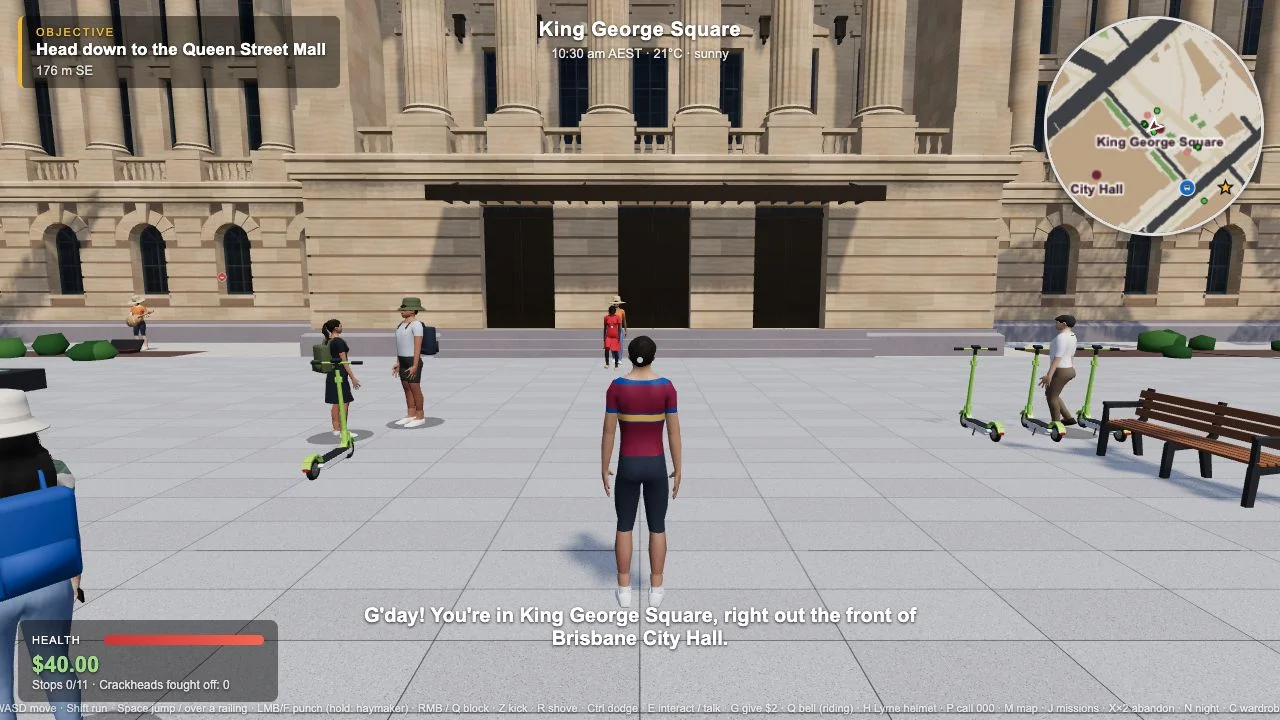
We opened the title screen, expanded How to play and waited until Play became available. Entering the game showed a character in King George Square with an objective toward Queen Street Mall. M opened a city map and a list of 11 missions; none had been completed. Escape opened the pause panel and its three graphics presets. We stopped at that orientation stage, so this guide does not rate mission quality, driving feel, fighting or NPC dialogue.
Learn a few keys before the full control sheet
Start with WASD, M for the map and Escape for pause. Once comfortable, consult E for interactions and J for the mission journal. The published instructions add separate driving, riding and action controls, so a key can do different things in different contexts. Read the on-screen prompt rather than assuming every control always has the same effect. The website includes touch instructions, but our desktop check does not establish how a phone will perform.
Use the map as a planning step
The observed map placed mission markers across the city and paired them with a named list. Pick a nearby objective, compare its marker with your current position and decide how you will reach it before trying a vehicle. The opening objective is a useful reference point even if you later choose another activity. Do not confuse this fictional map with live directions, public-transport information or a real emergency service.
Pause early and check graphics
The pause menu displayed Performance, Balanced and Quality options. If loading or frame rate is uncomfortable, inspect the available settings and start with a modest preset rather than assuming the largest setting suits your hardware. The game checks for WebGL 2 support. A browser that cannot provide it may need an updated browser or enabled hardware acceleration; this is not a measured guarantee that every supported device runs smoothly.
Treat an exported save as a separate copy
The game describes storage in this browser only, plus export and import controls. Before returning for a longer session, check which browser profile you are using. Changing devices, using a private window or clearing site storage can make local progress unavailable. An exported file can be a useful separate copy, but our review did not test saving, downloading or importing it. Confirm restoration yourself before relying on it.
Know the boundaries of a casual session
The credits identify an early testing build and disclaim official affiliation. The title page also warns of violence and strong language. NPC dialogue is described as AI-processed with up to 30-day logging. Play statistics and crash reports have a separate setting and different stated retention periods. None of that dialogue or microphone input was tested; keep private information out of in-game conversation and read the current disclosure before continuing.
Read the official source ↗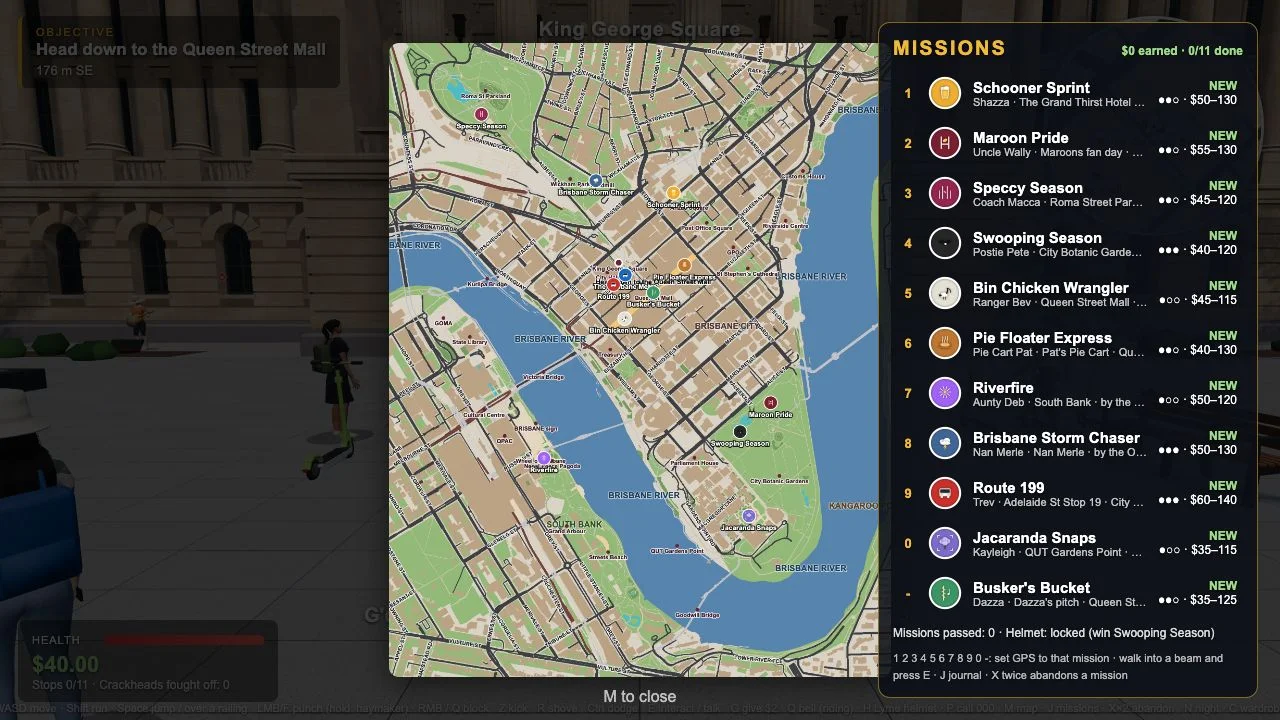
A short first-session checklist
- Wait for Play, then inspect How to play before entering.
- Locate your character, starting place and current objective.
- Open M and compare a mission marker with your current position.
- Close the map and use Escape to find the pause and graphics controls.
- Choose a short first activity only if the scene runs comfortably.
- Review save export and privacy choices before a longer session.
Brisbane Streets FAQ
Where can I play Brisbane Streets?
The linked game is at brisbane-streets.pages.dev. We reached its title and opening scene in a desktop browser on October 24, 2026.
What should I do first?
Read the current objective, open the map with M and learn Escape to pause. This gives you a way to orient yourself before taking a mission.
How many missions were visible?
The map listed 11 missions during our check, with 0 completed. We did not play through them, and the early testing build may change.
Do I need to pay or sign in?
We reached the inspected title and game scene without payment or sign-in. The website advertises free browser play; optional support features were not tested.
Will progress follow me to another device?
The site says saves are browser-local and provides export/import controls. Do not assume automatic account-based sync; a restoration test was outside this review.
Is the game suitable for every casual player?
The official entry warns of violence and strong language. Read that notice and the AI chat/privacy disclosure before deciding whether to play.
Is the map accurate enough for a real visit?
Treat it as a fictional game world. The official credits acknowledge map sources, but do not establish live accuracy, route suitability or council endorsement.
Related by purpose
Mela Chaloge offers a fairground-themed exploration session with a different setting and controls.
Sources and review scope
Reviewed October 24, 2026: title, controls, Play, opening scene, city map, mission list and pause settings. Mission completion, driving, AI chat, microphone and save restoration were not tested.