
Why it’s here: what is ATVNCG 3D Map?
ATVNCG 3D Map is a Vietnamese browser tool for exploring a concert audience layout and viewing it from different positions. NavSprout includes it for a practical task: compare one standing or seated zone with another, write down what the model shows and separate that from what a ticket seller or organizer must confirm. The 3D view can make orientation easier, while its estimates mean it cannot settle every question about a real visit.
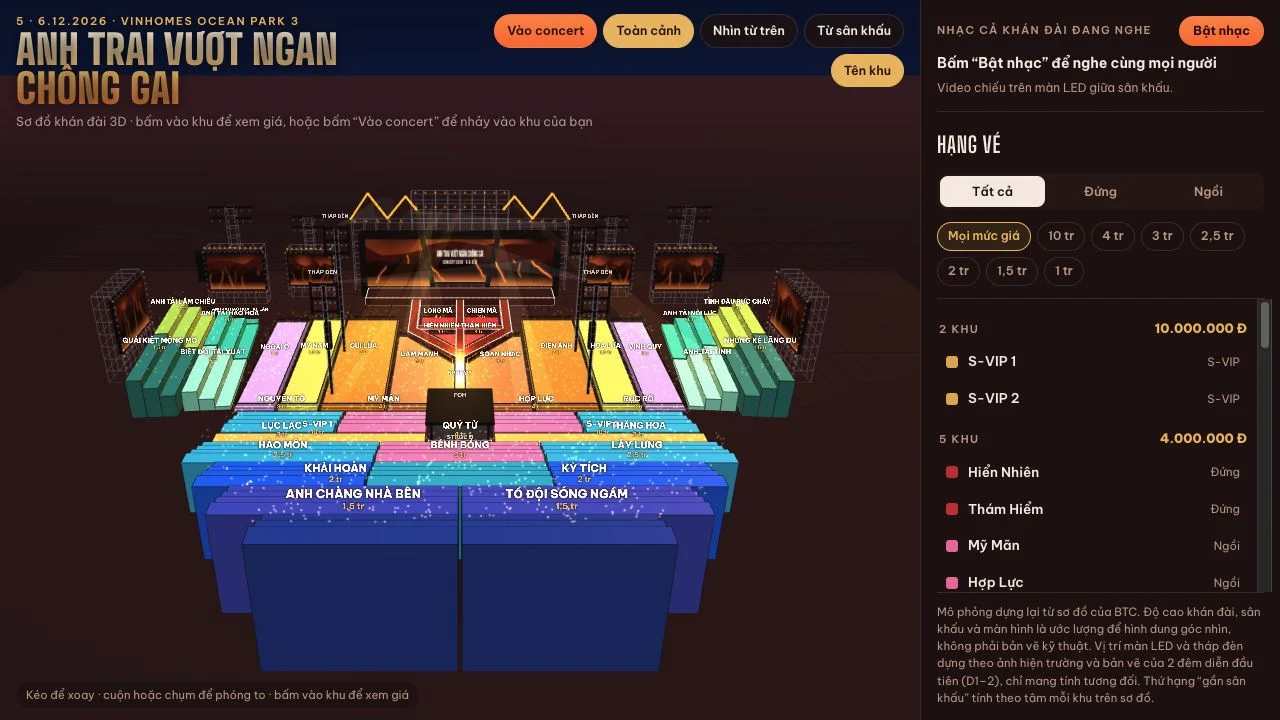
What can you explore in ATVNCG 3D Map?
- Start with a whole-venue model before narrowing to a zone
- Filter the zone list by standing or seated type
- Inspect price-group labels and two stage-proximity ranks
- Switch into an audience-area camera without virtual entry
- Return to the map and compare a second area
Why start with the whole layout?
Before comparing prices, locate the main stage, runway and secondary stage in the model. A zone can be near one part of the performance space and farther from another. The overview provides orientation; the overhead view makes the arrangement easier to compare. Treat these as two complementary views of the same model rather than assuming the most dramatic camera angle gives the most useful comparison.
How do you narrow the first comparison?
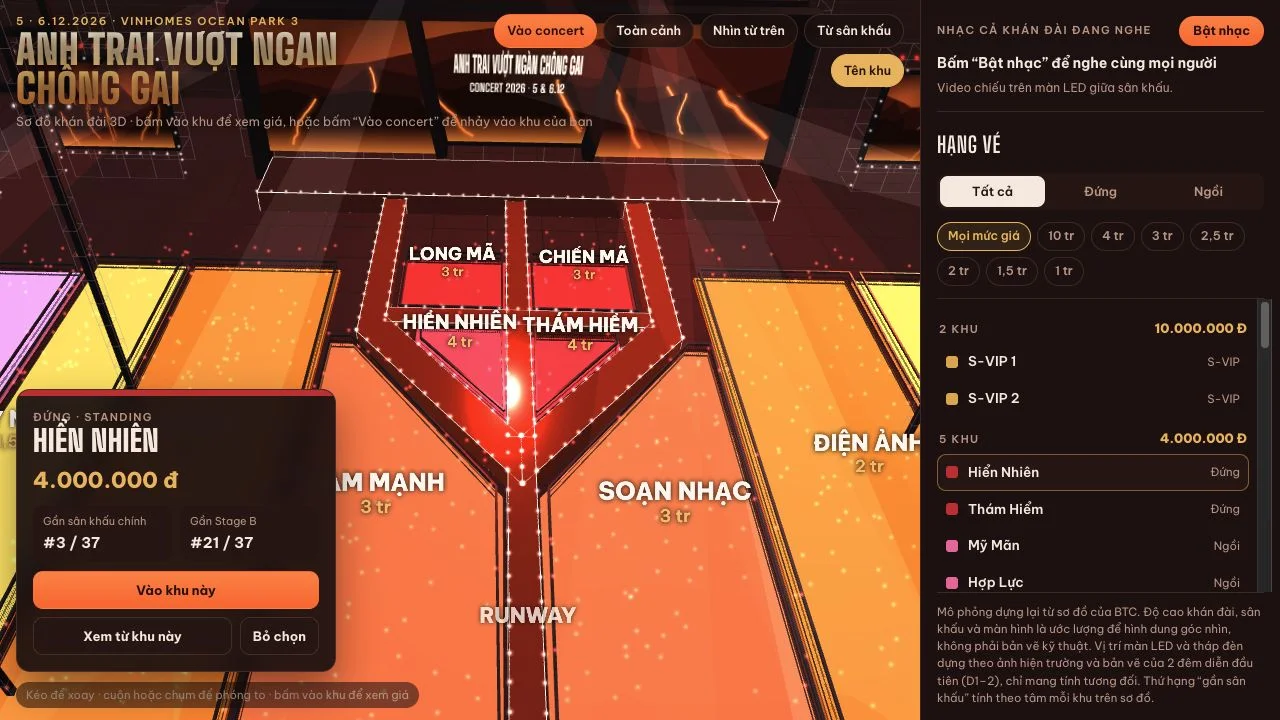
Decide whether you are exploring standing or seated areas and apply that category in the sidebar. We tested the seated filter and observed a different list of zones, then used a named standing area as our preview example. Keep the zone name, category and displayed amount together in your notes. A price group alone does not tell you which part of the stage the area faces.
What does the audience preview add?
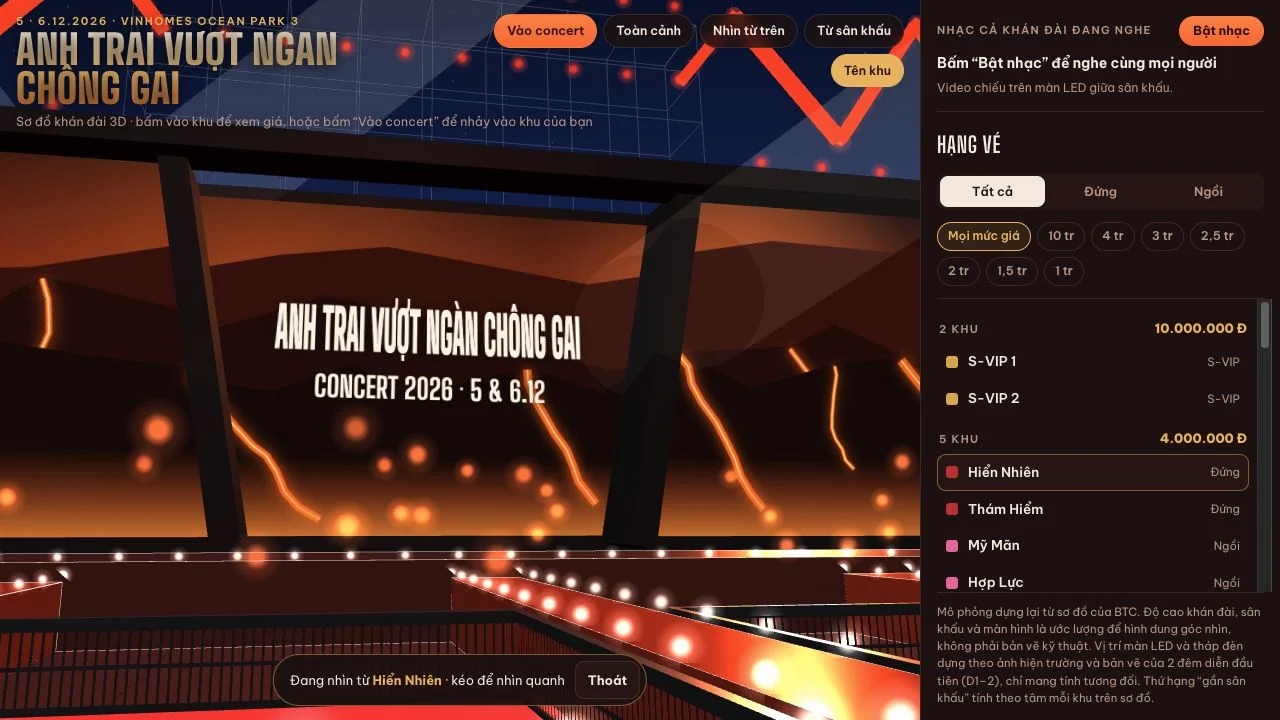
Our selected standing-zone card exposed a view-from-this-zone control. Opening it placed the camera in the modeled audience area, with an exit available to return to browsing. That lets you inspect the stage direction before comparing another area. It does not reproduce the height of a particular attendee, people standing in front, exact seat position or every structure at the actual event.
Which numbers are worth writing down?
Record the displayed amount and both proximity rankings instead of reducing the comparison to one closeness label. The map explains that those rankings use zone centers. A favorable rank toward the main stage can coexist with a less favorable one toward Stage B, and neither is a comprehensive view-quality rating. Amounts in the model were not checked against current ticket inventory or a completed checkout.
Do you need the social concert features for this task?
No. We completed the map-to-preview route without entering a virtual session. A separate entry dialog asked for a display name, show night and zone; we canceled it. Movement, dancing, chat and music are presented by the interface, but they were outside this comparison test. You can keep a short research session focused on zone orientation without sending a message or joining the social experience.
What should you verify after using the map?
Take your shortlist to current authorized event information and confirm the actual plan, availability, access rules and any accessibility requirements. The model identifies heights and placements as estimates, not engineering measurements. The checked header shows a 2026 event context, which we did not independently verify. Browsing and previewing required no account or payment in our test; real event admission is a separate matter.
Try this: compare two zones and one unresolved question
Aim to leave with a clearer question, not a simulated-view screenshot treated as a ticket guarantee.
- Open the overview and identify both performance areas.
- Switch overhead to understand how the audience zones fit together.
- Choose standing or seated to narrow the sidebar list.
- Open one zone and record its amount and two proximity rankings.
- Preview the camera, exit and repeat for a second zone.
- Write down one remaining question about the real view or admission and verify it with the authorized source.
ATVNCG 3D Map FAQ
What task is ATVNCG 3D Map good for?
It helps you compare the relative layout of named concert zones and inspect an approximate stage-facing view before researching tickets further.
Is this a ticket-booking tool?
Our tested flow was a public 3D map, category filter, zone card and camera preview. We did not test a booking, payment or reservation.
Can I compare seated and standing zones?
The sidebar offers both audience types. We changed the seated filter and observed its zone list, then tested a named standing-zone preview.
Can a preview guarantee visibility at the real event?
No. The map uses estimated geometry and zone-level viewpoints. Verify the current layout and practical viewing conditions separately.
Do I have to use chat or music?
Neither was required for our map comparison. We left social entry unsubmitted and did not send chat or enable music.
Keep exploring
Browse more everyday utilities for other ways to turn visual information into a useful comparison.
Sources and review scope
Desktop check, October 31, 2026: overview and overhead cameras; seated filter; Hiển Nhiên standing-zone card; audience preview and exit; virtual-entry form opened then canceled. No name submitted, chat sent, music enabled, ticket transaction, completed social session, mobile-device test or independent geometry/schedule/organizer verification.