Before moving between SongHub and its activation website, decide which device you want to activate. A phone and a television follow different documented handoffs, but both depend on the Hardware ID from the intended device. This tutorial walks through the page’s instructions, shows what its screens look like and points out the checks to make before submitting a request.
Inside the SongHub activation page
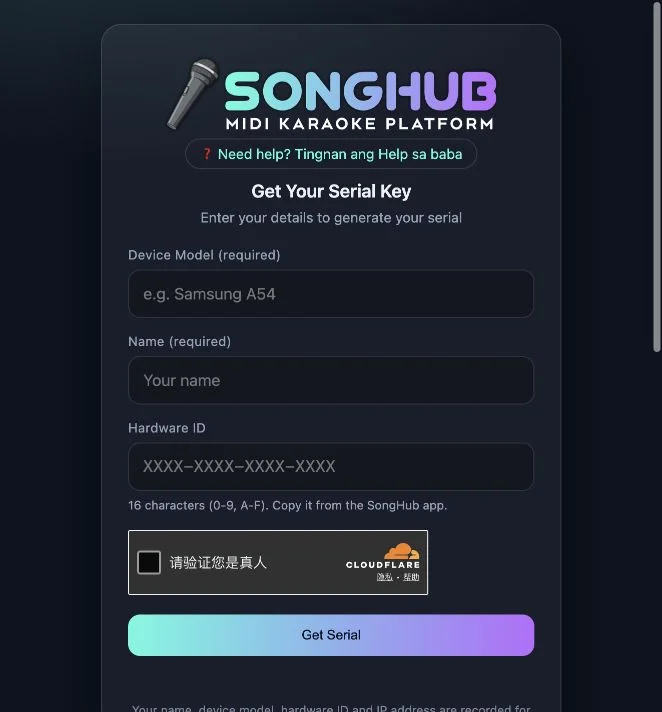
Phone serial or TV license file?
| Route | Device ID to use | Documented handoff |
|---|---|---|
| Phone / tablet | The target phone or tablet | Copy the serial back into that app’s activation screen |
| Android / Google TV | The target television | Transfer the downloaded .lic file and select it in the TV app |
These are the site’s documented instructions. Neither route was completed in our review.
Before you start
Have the SongHub app available on the device you want to activate. Open its activation screen and keep that device nearby while reading the web instructions. This tutorial explains the supplied activation page; it does not provide an app installer or generate a license on this website.
Prepare the target device first
Open the activation screen in the SongHub app and obtain the Hardware ID from that device. The website asks for a device model, a name and that identifier; its helper describes sixteen hexadecimal characters. Keep the target device in mind throughout the task. Using your phone to visit the web page does not mean the phone’s own ID belongs in a request intended for a television.
Phone and tablet route: keep the app and web page distinct
The Phone/Tablets help describes copying the device ID from the app, requesting a serial on the web page and returning to the app to paste and activate it. Keep both destinations available so you can check which field belongs where. We read this documented flow but did not submit the form, obtain a key or complete activation in the app.
TV route: a file can replace remote-control typing
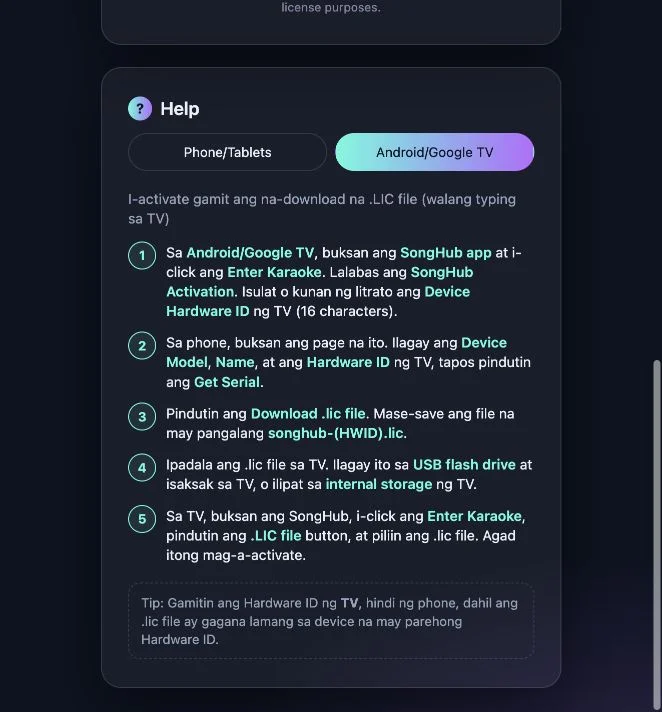
The Android/Google TV help describes downloading a .lic file after requesting the serial, moving it to the television and choosing it through the app’s license-file control. The important preparation is the TV’s Hardware ID. A phone can help obtain and transfer a file, but the page says that the license must match the receiving device. USB and internal storage are mentioned as transfer options.
Check the page’s data notice before submitting
The public notice says that the supplied name, model, Hardware ID and IP address are recorded for licensing. That information is relevant before you press Get Serial. Our walkthrough leaves the form blank and does not send any device identifier. Use the destination’s own current information to decide whether to continue; we did not audit its backend or retention practices.
If you are unsure what to enter
Go back to the target app’s activation screen rather than guessing a Hardware ID. Compare the field labels and choose the matching help tab. A downloaded file should correspond to the device you intended to activate. The page does not establish a universal solution for a changed device, a rejected key or an expired entitlement, and we did not test those outcomes.
Know what this guide does and does not cover
The public form and help tabs were inspected on October 20, 2026. No serial was generated, no license file was downloaded and no app installation or playback was tested. The screenshot of a form is not proof of completed activation. Current pricing, eligibility and any account-specific license conditions were not established by this visit.
Prepare for the documented activation flow
- Open SongHub on the device you intend to activate.
- Find its activation screen and copy or record its Hardware ID.
- Read the web page’s field requirements and licensing data notice.
- Choose the Phone/Tablets or Android/Google TV instructions.
- Follow the documented route on the external site if you choose to submit; keep the target device consistent.
Who this tutorial is for
People who already have the SongHub app and want to prepare for its documented activation workflow.
What our check establishes
This tutorial explains the public activation page. We checked the interface and instructions only, without submitting a name, Hardware ID or serial request.
SongHub activation FAQ
What is the SongHub activation page?
It is the public Get Serial page at songhub-activation.pages.dev. It documents a licensing workflow for an existing SongHub karaoke app; it is not a browser karaoke player.
What information does the form request?
The visible fields are Device Model, Name and Hardware ID. The Hardware ID helper describes sixteen hexadecimal characters, using 0–9 and A–F.
Where do I get the Hardware ID?
The page’s help directs users to the SongHub app’s activation screen. Copy or record the identifier from the device you actually want to activate.
Which ID should I use for Android or Google TV?
Use the television’s Hardware ID, even if a phone is used to open the request page or move the file. The help says the license works only with the matching device ID.
What is the .lic option?
It is the documented TV activation route: obtain the license file from the page, transfer it to the TV and select it in the app. We inspected the instructions, not a generated file or successful import.
Does the page record submitted details?
Its visible notice says that the name, device model, Hardware ID and IP address are recorded for license purposes. We did not audit storage, retention or backend handling.
Is activation free?
Current pricing, eligibility and full license terms were not established by our interface review. The presence of a public form does not by itself confirm that every app installation is entitled to a free license.
Did you generate a serial or activate the app?
No. We inspected the public form and help tabs without submitting personal or device details, completing verification, generating a serial, downloading a license or activating an app.
Source and review scope
SongHub Karaoke — Get Serial ↗ is the supplied activation destination. Its Help section contains Phone/Tablets and Android/Google TV instructions, mainly in Filipino with English interface labels. We inspected the public form and selected the TV help tab on October 20, 2026. We did not submit details, complete the verification widget, generate a serial, download a license or activate an app. Screenshots show the actual public interface with empty fields.